
Lazy-loading with @defer
Master Angular lazy-loading with @defer and learn how to control triggers, placeholders, loading behaviour, and error states for standalone components.

Alain Chautard
March 17, 2026
Lazy-loading with @defer
Today, let’s cover how to fully customize lazy-loading with Angular using @defer.
What’s great about @defer is that it no longer relies on the Angular router. You can lazy-load any standalone component anywhere, anytime, and on your terms, as you can decide the trigger to load that component.
Let’s start with a basic example:
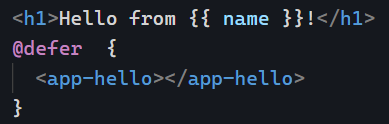
The above code will load the HelloComponent as soon as the browser is idle, which means it’s done loading everything else. While that is happening, we can decide to display a placeholder, and in my case, I decided that such a placeholder would be displayed for a minimum of 2 seconds no matter what. You can use seconds (s) or milliseconds (ms) as a time unit:
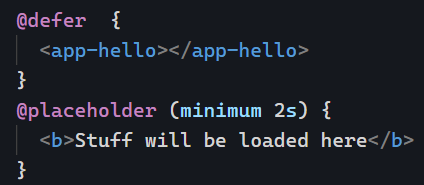
You can see the above code in action here on Stackblitz. Note that the Angular Language service was updated accordingly, so VS Code (Stackblitz is a web-based VS code), Webstorm, and other IDEs already know about the new @defer syntax and do proper highlighting of it!
We can also specify a loading template and an error template, all customizable with a minimum amount of time during which we would display those templates (example on Stackblitz here):
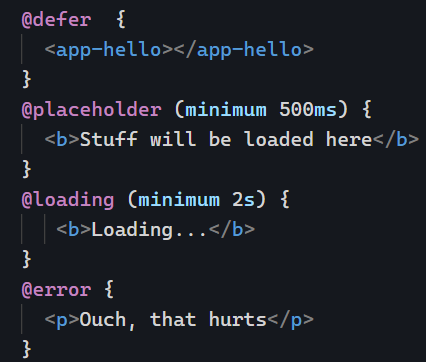
I used “big” numbers to see the different states in my examples. Note that @loading supports an “after ” option only to show the loading template if loading takes more than a certain amount of time, so you don’t have to display anything if the component loads quickly. Both parameters are optional:
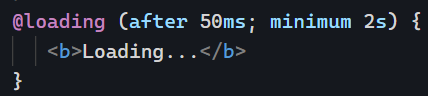
These are the different new blocks available with @defer.
Next, you can look at the different trigger options.
This article originally appeared on Angular Training.
More certificates.dev articles
Get the latest news and updates on developer certifications. Content is updated regularly, so please make sure to bookmark this page or sign up to get the latest content directly in your inbox.

Component Architecture for React Server Components
React Server Components let each component fetch its own data, so pages compose instead of prop-drilling. How that reshapes architecture, loading boundaries, and UX.

Aurora Scharff
Aug 20, 2026
Background Jobs with Nitro Tasks API
How to run one-off and scheduled background work in Nuxt using Nitro's Tasks API, and what to watch for per deployment platform.

Reza Baar
Aug 19, 2026
What’s new in Angular 22.1?
Angular 22.1 introduces a major change to Angular’s release cycle, moving to one major release per year. Learn what this means for Angular upgrades, versioning, and the future of the framework.
Alain Chautard
Aug 18, 2026